ニュース
「Google Chrome 147」が正式版に、60件もの脆弱性を修正 ~うち2件は深刻度「Critical」
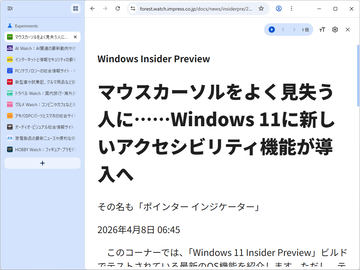
目玉はやはり「垂直タブ」と新しい「リーディング モード」
2026年4月9日 10:12

米Googleは4月7日(現地時間)、デスクトップ向け「Google Chrome」の安定(Stable)チャネルをアップデートした。Windows/Mac環境にはv147.0.7727.55/56が、Linux環境にはv147.0.7727.55が順次展開される。
メジャーアップデートとなる「Chrome 147」では、待望の「垂直タブ」や、“イマーシブ”な(没入感のある)「リーディング モード」が導入される。「Chrome」の使い勝手を大きく向上させる、期待の改善だ。
加えて、開発者向けには以下の要素が提供される。
- 要素スコープのビュー遷移:ビューの移動アニメーションを複数同時に行ったり、ネストされたビューに対して実行できるように。トランジション効果の表現力が向上
- CSSの「contrast-color()」:白黒のうち、指定した色とのコントラストの大きい方を返す関数。色のアクセシビリティを確保する際に便利なCSS関数
- CSSの「border-shape」プロパティ:円やポリゴンなど、長方形ではない境界線を作成
セキュリティ関連の修正は、以下の通り。CVE番号が付番された脆弱性だけでも、60件に上る。
- CVE-2026-5858:Heap buffer overflow in WebML(Critical)
- CVE-2026-5859:Integer overflow in WebML(Critical)
- CVE-2026-5860:Use after free in WebRTC(High)
- CVE-2026-5861:Use after free in V8(High)
- CVE-2026-5862:Inappropriate implementation in V8(High)
- CVE-2026-5863:Inappropriate implementation in V8(High)
- CVE-2026-5864:Heap buffer overflow in WebAudio(High)
- CVE-2026-5865:Type Confusion in V8(High)
- CVE-2026-5866:Use after free in Media(High)
- CVE-2026-5867:Heap buffer overflow in WebM(High)
- CVE-2026-5868:Heap buffer overflow in ANGLE(High)
- CVE-2026-5869:Heap buffer overflow in WebML(High)
- CVE-2026-5870:Integer overflow in Skia(High)
- CVE-2026-5871:Type Confusion in V8(High)
- CVE-2026-5872:Use after free in Blink(High)
- CVE-2026-5873:Out of bounds read and write in V8(High)
- CVE-2026-5874:Use after free in PrivateAI(High)
- CVE-2026-5875:Policy bypass in Blink(Medium)
- CVE-2026-5876:Side-channel information leakage in Navigation(Medium)
- CVE-2026-5877:Use after free in Navigation(Medium)
- CVE-2026-5878:Incorrect security UI in Blink(Medium)
- CVE-2026-5879:Insufficient validation of untrusted input in ANGLE(Medium)
- CVE-2026-5880:Incorrect security UI in browser UI(Medium)
- CVE-2026-5881:Policy bypass in LocalNetworkAccess(Medium)
- CVE-2026-5882:Incorrect security UI in Fullscreen(Medium)
- CVE-2026-5883:Use after free in Media(Medium)
- CVE-2026-5884:Insufficient validation of untrusted input in Media(Medium)
- CVE-2026-5885:Insufficient validation of untrusted input in WebML(Medium)
- CVE-2026-5886:Out of bounds read in WebAudio(Medium)
- CVE-2026-5887:Insufficient validation of untrusted input in Downloads(Medium)
- CVE-2026-5888:Uninitialized Use in WebCodecs(Medium)
- CVE-2026-5889:Cryptographic Flaw in PDFium(Medium)
- CVE-2026-5890:Race in WebCodecs(Medium)
- CVE-2026-5891:Insufficient policy enforcement in browser UI(Medium)
- CVE-2026-5892:Insufficient policy enforcement in PWAs(Medium)
- CVE-2026-5893:Race in V8(Medium)
- CVE-2026-5894:Inappropriate implementation in PDF(Low)
- CVE-2026-5895:Incorrect security UI in Omnibox(Low)
- CVE-2026-5896:Policy bypass in Audio(Low)
- CVE-2026-5897:Incorrect security UI in Downloads(Low)
- CVE-2026-5898:Incorrect security UI in Omnibox(Low)
- CVE-2026-5899:Incorrect security UI in History Navigation(Low)
- CVE-2026-5900:Policy bypass in Downloads(Low)
- CVE-2026-5901:Policy bypass in DevTools(Low)
- CVE-2026-5902:Race in Media(Low)
- CVE-2026-5903:Policy bypass in IFrameSandbox(Low)
- CVE-2026-5904:Use after free in V8(Low)
- CVE-2026-5905:Incorrect security UI in Permissions(Low)
- CVE-2026-5906:Incorrect security UI in Omnibox(Low)
- CVE-2026-5907:Insufficient data validation in Media(Low)
- CVE-2026-5908:Integer overflow in Media(Low)
- CVE-2026-5909:Integer overflow in Media(Low)
- CVE-2026-5910:Integer overflow in Media(Low)
- CVE-2026-5911:Policy bypass in ServiceWorkers(Low)
- CVE-2026-5912:Integer overflow in WebRTC(Low)
- CVE-2026-5913:Out of bounds read in Blink(Low)
- CVE-2026-5914:Type Confusion in CSS(Low)
- CVE-2026-5915:Insufficient validation of untrusted input in WebML(Low)
- CVE-2026-5918:Inappropriate implementation in Navigation(Low)
- CVE-2026-5919:Insufficient validation of untrusted input in WebSockets(Low)
なかでも「CVE-2026-5858」「CVE-2026-5859」は、深刻度が4段階中最高の「Critical」と評価された、致命的な脆弱性だ。できるだけ早い対応が望ましい。
デスクトップ向け「Google Chrome」はWindows/Mac/Linuxに対応しており、現在、同社のWebサイトから無償でダウンロード可能。Windows版は、Windows 10/11に対応している。すでにインストールされている場合は自動で更新されるが、設定画面(chrome://settings/help)にアクセスすれば手動でアップデート可能。アップデートを完全に適用するには、「Google Chrome」の再起動が必要だ。
Amazonで購入
